MASTERING PRODUCT DEMO VIDEOS: A COMPREHENSIVE STEP-BY-STEP PRODUCTION GUIDE
Product demo videos help buyers see how a product works before they commit. A strong demo can explain key features, answer common questions, reduce hesitation, and give sales or marketing teams a clearer way to show value.
This guide walks through the production process, from planning and scripting to filming, editing, delivery, and platform formatting. It is built for marketers, business owners, producers, and teams preparing a product video for a website, sales presentation, launch campaign, or social media.
What Is a Product Demo Video?
A product demo video shows how a product works in a clear and visual way. It may feature a physical product, software platform, mobile app, device, tool, service, or piece of equipment. The goal is not just to make the product look good. The goal is to help viewers understand what it does, how it solves a problem, and why it matters.
Some product demo videos are simple and direct. They may show a person using the product while a voice-over explains each step. Others use screen recordings, motion graphics, animation, customer use cases, studio footage, or a mix of different formats.
A good product demo should answer three questions quickly:
- What is the product?
- How does it work?
- Why should the viewer care?
- When those answers are clear, the video can support marketing, sales, training, onboarding, and customer education.
Set the Goal, Audience, and Budget
Before production begins, define the purpose of the video. A demo made for a product launch may look different from a demo created for a sales team, support center, paid ad, or trade show booth.
Start by identifying the main audience. Are you speaking to first-time buyers, existing customers, investors, internal teams, retail partners, or technical users? The answer affects the script, pacing, level of detail, and final video length.
Next, decide what action the viewer should take after watching. That action may be to request a quote, start a free trial, schedule a call, download an app, buy a product, or understand how to use something they already purchased.
The budget should also be discussed early. Product demo video cost can change based on the production style, crew size, filming location, number of shoot days, talent, animation, graphics, editing, and final deliverables. A simple screen-recorded software demo will usually require a different budget than a studio shoot with talent, product styling, camera crew, lighting, and motion graphics.
Clear planning helps avoid extra shoot days, rushed edits, unclear messaging, and budget surprises later in the process.
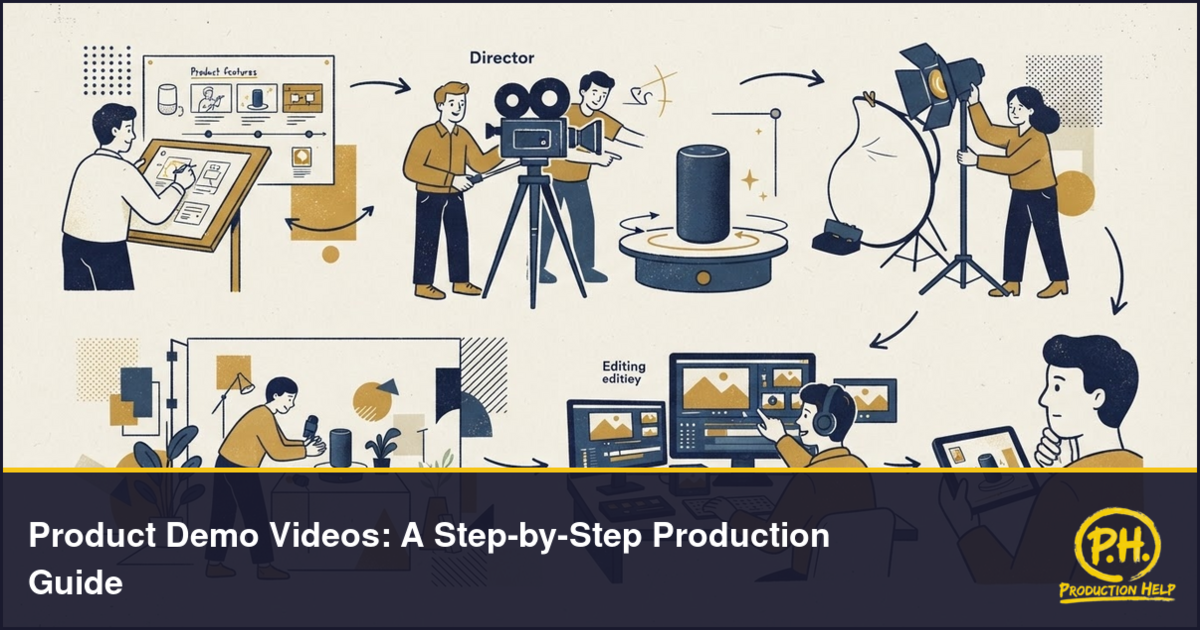
Write the Script and Build the Storyboard
The script is the foundation of the product demo. It should explain the product clearly without sounding too technical, too sales-heavy, or too long.
A strong demo script usually follows a simple flow:
Introduce the problem.
- Show the product.
- Explain the most important features.
- Demonstrate how it works.
- Highlight the benefit.
- End with a clear next step.
Keep the language direct. Viewers should not have to work hard to understand what they are seeing. Each sentence should support the visual, not repeat it in a boring way.
A storyboard or shot list is also helpful. This does not have to be complicated. It can be a simple document that shows each scene, what appears on screen, what the voice-over or presenter says, and any graphics, captions, or product close-ups that should be added later.
For software or app demos, the storyboard may include screen flows, feature callouts, cursor movement, dashboard sections, and mobile views. For physical products, it may include tabletop shots, lifestyle shots, close-ups, packaging, hands-on use, and before-and-after examples.
The goal is to give the production team a clear map before filming or recording begins.
Choose the Right Production Style
The best style depends on the product, audience, budget, and where the video will be used.
A live-action product demo works well for physical products, devices, tools, equipment, consumer goods, and products that benefit from seeing real people use them. This style may include a presenter, hand model, product close-ups, lifestyle scenes, studio footage, or on-location filming.
A screen-recorded demo works well for software, apps, dashboards, online tools, SaaS products, and digital platforms. Clean screen capture, zoomed-in feature highlights, voice-over, captions, and simple motion graphics can make the workflow easier to follow.
An animated demo can help explain products that are technical, abstract, not yet built, or difficult to film. Animation can show internal systems, product benefits, process flows, and complex features in a simplified way.
A hybrid demo combines several styles. For example, a software company may use a founder introduction, screen recording, motion graphics, and customer use cases in one video. A hardware company may combine studio product shots, lifestyle footage, animated callouts, and voice-over.
Choose the format that makes the product easiest to understand. The most expensive style is not always the best one. The clearest style is usually the strongest.
Hire the Right Crew and Equipment
The right crew helps turn the plan into a polished video. For a basic product demo, the team may include a producer, camera operator, sound mixer, lighting technician, editor, and motion graphics artist. Larger projects may also involve a director, scriptwriter, art director, product stylist, makeup artist, voice-over artist, talent, and production assistant.
For physical products, camera quality, lighting, lens choice, and product handling matter. Small details such as reflections, fingerprints, packaging, screen glare, dust, and shadows can affect how the product looks on camera.
For software demos, clean screen capture is important. The product interface should be prepared before recording. Test accounts, sample data, notifications, browser tabs, and private information should be cleaned up in advance.
Equipment can vary by project, but common production tools include professional cameras, lenses, lighting kits, microphones, stabilizers, teleprompters, backdrops, product tables, monitors, and editing software. For studio or tabletop work, controlled lighting and camera support are especially important.
ProductionHelp.io can help teams find video production companies, videographers, camera operators, editors, studios, soundstages, and equipment rental providers for product demo shoots. This is useful when the project calls for a local crew, a specialized setup, or additional production support in another city.
Filming Tips for Product Demo Videos
Filming should focus on clarity. Viewers should always know what they are looking at and why it matters.
Start with clean product presentation. Make sure the product is camera-ready before filming. Check surfaces, labels, screens, cables, packaging, props, and any background elements that appear in the shot.
Use close-ups to show important details. Product buttons, textures, materials, screens, ports, moving parts, and key features should be easy to see. A wide shot can show context, but close-ups help viewers understand the product more clearly.
Keep the action simple. If a person is using the product, the movement should be natural and easy to follow. Avoid cluttered demonstrations where too many things happen at once.
Control the sound. Even if the final video uses voice-over, clean production audio can still help during editing. For demos with a presenter, interview, or live explanation, audio quality is just as important as the image.
Plan for multiple versions. During filming, capture extra shots that can be used for social clips, thumbnails, cutdowns, landing pages, and future ads. Product close-ups, reaction shots, lifestyle moments, and clean background shots can be valuable during post-production.
Editing, Graphics, Captions, and Sound
Editing turns the raw footage into a clear, polished demo. The editor should remove slow moments, organize the story, match the visuals to the script, and keep the pacing tight.
Graphics can make the video easier to understand. These may include feature labels, arrows, icons, screen highlights, product specs, lower thirds, step numbers, and call-to-action screens. Good graphics support the message without overwhelming the viewer.
Captions are important for accessibility and social viewing. Many people watch videos without sound, especially on social platforms, websites, and mobile devices. Captions help viewers follow the message even when audio is muted.
Sound design and music also matter. Music should match the brand and product tone. It should not distract from the voice-over or presenter. For technical products, clean and subtle sound often works better than music that feels too dramatic.
The final edit should be reviewed for accuracy. Product names, feature claims, pricing, screen recordings, legal text, and calls to action should be checked before publishing.
Best Video Lengths and Formats by Platform
The best length depends on the purpose of the video. A product demo for a website can often be longer than a paid social ad. A sales enablement video may allow more detail than a short product teaser.
For a website or product page, a good demo may run around 60 to 120 seconds. This gives enough time to explain the product, show the main features, and end with a clear next step.
For social media, shorter versions often work better. A 15 to 30 second cut can highlight one feature, one problem, or one benefit. A 30 to 60 second version can work for a more complete but still fast-paced overview.
For software walkthroughs, longer videos may be useful when the audience expects detail. These can be used for onboarding, support, training, or sales follow-up. In those cases, the video should still be organized into clear sections so viewers can follow the process easily.
Common deliverables may include:
- A full-length product demo
- Short social media cutdowns
- Vertical, square, and horizontal versions
- Captioned versions
- Thumbnail images
- Website hero video clips
- Sales presentation versions
- Trade show or event screen versions
Plan the required formats before editing begins. This helps the production team frame shots correctly and avoid cropping problems later.
What Affects Product Demo Video Cost
Product demo video cost depends on the scope of the project. A simple one-location shoot with a small crew will usually cost less than a multi-day production with talent, studio rental, custom graphics, animation, and several final versions.
The product type also affects the budget. A software demo may require screen recording, voice-over, editing, captions, and motion graphics. A physical product demo may require camera crew, lighting, product styling, props, location rental, and more detailed shot planning.
Other cost factors include:
- Scriptwriting and creative planning
- Storyboard or shot list development
- Studio or location rental
- Crew size
- Camera, lighting, and audio equipment
- Presenter, actor, hand model, or voice-over talent
- Product preparation and styling
- Motion graphics or animation
- Editing rounds
- Music licensing
- Captions and subtitles
- Social media cutdowns
- Rush delivery
The best way to control cost is to define the scope early. Know how many videos are being created, how long each version should be, how many filming days are planned, and what final assets should be delivered.
A clear production brief helps vendors quote the project more accurately.
Questions to Answer Before Hiring a Production Team
Before contacting a video production company or freelance crew, prepare the key details. This makes the conversation faster and helps the production team understand the project.
Useful questions include:
- What product are we demonstrating?
- Who is the target audience?
- What is the main message?
- What problem does the product solve?
- Where will the video be used?
- How long should the final video be?
- Do we want live action, screen recording, animation, or a hybrid style?
- Do we already have a script?
- Do we have brand guidelines?
- Will we use a presenter, voice-over, talent, or only visuals?
- Where will filming happen?
- How many products, features, or workflows should be shown?
- Do we need social media cutdowns?
- Do we need captions or subtitles?
- What is the target deadline?
- What is the budget range?
The more details you can provide, the easier it is for the production team to recommend the right crew, schedule, equipment, and workflow.
Find Product Demo Video Crews on ProductionHelp.io
A product demo video is easier to plan when the right production partners are involved from the start. ProductionHelp.io helps brands, agencies, marketers, producers, and business owners find video production support for product demos, explainer videos, corporate content, interviews, branded campaigns, and other production projects.
Use ProductionHelp.io to find video production companies, videographers, camera crews, studios, soundstages, editors, equipment rental houses, and other production resources. You can compare providers, review service categories, and connect with professionals who fit the project location, style, and scope.
If you are preparing a product demo video, start with a clear goal, a simple script, a realistic budget, and a production team that understands how to make the product easy to understand on camera.